


Visual Voicemail
3.614.91K Reviews
App Specs
- Version
- 11.5.0.684478
- Updated On
- License
- Free
- Downloads
- 50,000,000+
- Developer
- Metro by T-Mobile
- Categories
- Business
- Platform
- Android
Screenshots



 Analysis by AppCompare
Voicemail is easy to put off when listening means working through a spoken menu one message at a time. I find a visual inbox more approachable because it lets me scan what arrived and choose what deserves attention first. Visual Voicemail is a focused Business app from Metro by T-Mobile, aimed at making that everyday task easier to handle on a compatible phone.
Who benefits from a visual inbox
This approach is most useful if you regularly receive calls while you are working, caring for someone, or unable to answer immediately. A list of messages gives you a quick way to spot which caller to follow up with, rather than listening to every recording in sequence. The app is free, and it is rated for Everyone, so there is no purchase decision to make before trying its basic voicemail workflow.
It also suits people who prefer to read before they listen. When a message arrives during a quiet meeting or in a place where playing audio would be awkward, a transcription can help you decide whether it needs attention now. I would still treat the text as a preview, not a perfect record: names, uncommon terms, and noisy speech can be misread, so listening remains the safer choice when exact wording matters.
Readability and navigation
Right off the bat, Visual Voicemail greets you with a clean and straightforward interface. No more guessing which button does what—everything is laid out in a user-friendly manner. It's like the app is saying, "Hey, I've got your back." Setting it up was a breeze; a couple of taps and I was good to go. And don't worry if you’re not a tech wizard, the app guides you through the process like a helpful buddy.
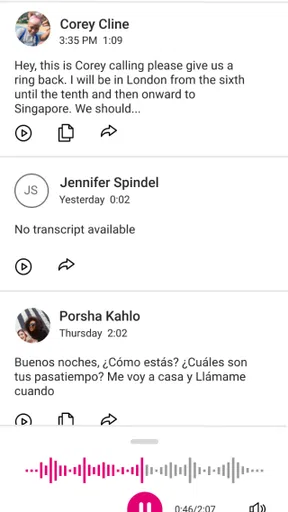
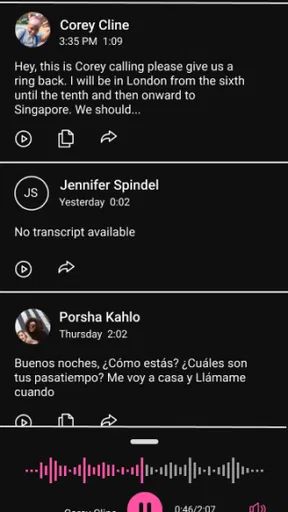
So, what's the big fuss about? Well, Visual Voicemail takes your voicemails and turns them into a visual list. You can see who called, when they called, and how long the voicemail is—right there on your screen. No more listening to that robotic voice telling you the date and time of each message. It's like having a personal assistant who’s super organized.
In practical terms, that layout helps me prioritize instead of treating every missed call as equally urgent. If I have several messages waiting, I can use the caller and timing information to choose an order, then open the recording that matters. A small but useful habit is to review the list after a busy stretch and handle callbacks in one batch; it is easier to keep track of who still needs a reply than relying on memory.
Motor and sensory considerations
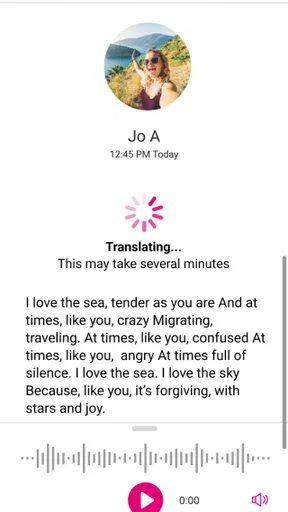
One feature I particularly loved is the transcription service. Yes, you heard me right! The app transcribes your voicemails into text. This means you can read your messages when you’re in a meeting or somewhere noisy. It’s not perfect, but pretty impressive most of the time. Plus, you can save or delete messages with just a swipe. Easy peasy.
Worth Reading Before You Choose

Flipboard Shows What News Apps Must Do Beyond the Feed

Switching to Android Auto Means Rethinking Your Driving Routine

Google Calendar Makes a Crowded Week Easier to Manage

Ludo King Makes the Most of the Minutes Between Plans

Baby Panda World Brings Quick Play to Modern Phones, but Its Game Library Feels Busy

ESPN’s Live Game View Makes Following Close Games Easier
Reading rather than playing audio can be helpful in shared spaces, and it may make a message easier to revisit when listening is uncomfortable or impractical. The option to work through a visual list also avoids having to remember spoken menu prompts while navigating a traditional voicemail system. At the same time, a swipe-based action can be less convenient for anyone who finds precise touch gestures difficult. I would take care with messages I want to keep: when using a gesture to delete or save, pause long enough to confirm the intended action rather than swiping quickly through a crowded inbox.
Transcription is best treated as a convenience, not a substitute for every recording. If a caller gives an address, a phone number, or an unfamiliar name, I would listen before acting on the text. This is a practical trade-off: text makes scanning faster, while audio preserves the caller’s voice and can clear up a transcription that looks odd. People who need every message to be available in text should test the app with the kinds of calls they actually receive before depending on that workflow.
Situational access and everyday use
Imagine I’m on a train when a family member calls, then leaves a message while I can’t answer. Playing it aloud might be inconsiderate, but the visual list lets me check who called and read the transcription if it is available. I can decide whether to step away and listen, wait until I’m somewhere quieter, or return the call later. That is a more considered choice than repeatedly dialing into voicemail just to find out whether the message is urgent.
The same pattern works for someone whose workday is interrupted by calls from customers or colleagues. Rather than breaking concentration every time the phone rings, they can check messages at a natural pause and handle callbacks together. For a small-business owner who uses a Metro by T-Mobile line, that can make voicemail less disruptive without turning it into a full customer-management system. If you need shared team access, call routing, or a record of conversations across several staff members, a dedicated business phone platform is likely a better fit.
Visual voicemail is also different from a standard voicemail dial-in. The usual system can be dependable and straightforward, but it asks you to listen through prompts and recordings in order. This app puts the messages into a browsable view, which is better for picking out a particular caller or checking several messages quickly. It is not a replacement for every carrier or phone’s voicemail setup, though: it is specifically associated with Metro by T-Mobile, so I would not assume it will work with another provider just because that provider supports voicemail.
Performance and reliability
In terms of performance, Visual Voicemail runs smoothly without any hitches. I've been using it for a couple of weeks now, and I haven't encountered any crashes or bugs. The app seems well-optimized for both Android and iOS, which is a relief. And since it's compatible with most carriers, you won't have to worry about switching providers just to use it.
Notifications are timely, ensuring you never miss out on a voicemail. And if you're the forgetful type, the app will remind you about unheard messages. It's like having a digital nagger, but in a good way.
For dependable day-to-day use, I would still make a point of checking that a new message appears after an important call, especially during initial setup. If a message does not show up as expected, the carrier voicemail route is a sensible fallback while you check the connection and app status. This is not a reason to avoid the visual interface; it is simply a good habit when a callback or time-sensitive message matters.
Privacy and security
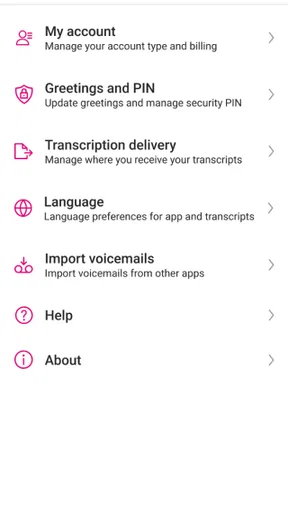
Now, let's talk about something we all care about—privacy. Visual Voicemail takes your data seriously. It uses secure encryption for your messages, so you can rest easy knowing your information is safe. The app doesn't overreach with permissions either, which is always a plus in my book.
Because voicemail can contain personal details, I would consider where message text may be visible before opening it in public. A transcription is convenient on a commute, but reading sensitive information over someone’s shoulder may be less private than listening with headphones later. That choice depends on the message, not just the app: use the visual preview for quick triage and save private conversations for a setting that feels comfortable.
Remaining barriers and trade-offs
While there's a lot to love, no app is perfect. The transcription feature, as mentioned earlier, isn't flawless. It occasionally struggles with names or unusual words, but hey, it's still a fantastic tool to have. Additionally, while the basic features are free, some advanced functionalities might come with a price tag. But honestly, the free version already offers so much that you might not even feel the need to upgrade.
Compatibility is an important practical consideration. The current version is 11.5.0.684478, and the minimum operating-system requirement is 8.0. Before relying on it, I would check that the phone meets that requirement and that the line is with Metro by T-Mobile. A person using another carrier, or someone whose device cannot run the app, should stick with the voicemail option their phone and provider already support rather than expecting this particular app to bridge the gap.
The app has an average rating of 3.7 from around 50,000 ratings, with about 15,000 written reviews, and it has passed 50 million installs. Those figures suggest that many people have tried it, but they do not tell me whether it will suit a particular phone, carrier, or accessibility need. I would judge it by the everyday task it handles: making voicemail easier to scan, while keeping the underlying limits of transcription and device compatibility in mind.
An inclusive verdict for the right voicemail routine
So, would I recommend Visual Voicemail? Absolutely. For anyone tired of the clunky, old-school voicemail system, this app is a breath of fresh air. It’s intuitive, efficient, and just makes life a little less complicated. Whether you're a busy professional or just someone who loves to keep things organized, give it a shot. Trust me, you won't look back.
And there you have it, folks! If you’re ready to upgrade your voicemail experience, you know what to do. Go ahead, give Visual Voicemail a try, and let's make managing messages a whole lot easier.
My recommendation comes with a clear boundary: this is for people who want a visual way to manage voicemail on a Metro by T-Mobile line, not for anyone seeking a universal inbox or a complete business communications tool. For that specific routine, the list view and text preview can reduce the effort of sorting missed calls, while the option to listen keeps the original message available when a transcript is uncertain.
If you rely on spoken prompts, need precise touch controls, or cannot comfortably read a small screen, I would try the app with a few ordinary messages before making it your only way to check voicemail. The visual format can remove some listening and memory demands, but it does not automatically solve every access barrier. For readers who find the balance suits them, it is a practical, free place to start; for others, the phone’s familiar dial-in voicemail or a more specialized communication service may be the better choice.
Pros
- User-friendly interface
- easy navigation.
- Quick setup with guided instructions.
- Supports multiple voicemail accounts.
- Transcription feature for easy reading.
- Playback speed adjustments available.
Cons
- Limited free storage space.
- Transcription accuracy varies.
- Requires stable internet connection.
- Not available in all regions.
- Ads in free version can be intrusive.
FAQs for Visual Voicemail
What is Visual Voicemail and how does it work?
Visual Voicemail is an app that allows you to see a list of your voicemail messages and select which ones to listen to or delete. Instead of calling your voicemail service, you can read transcripts, manage messages, and play them directly from your phone's screen, enhancing user experience and control.
Is Visual Voicemail compatible with all carriers and devices?
Visual Voicemail is generally compatible with most major carriers and devices, but availability can vary. It's important to check with your carrier to ensure support for Visual Voicemail on your specific device. Some older models or prepaid plans may not support this feature.
Are there any costs associated with using Visual Voicemail?
While the Visual Voicemail app itself may be free, some carriers might charge a fee for accessing visual voicemail features. It’s advisable to verify with your carrier about any potential costs or subscription requirements that might apply to your plan.
How do I set up Visual Voicemail on my phone?
Setting up Visual Voicemail typically involves downloading the app, if not pre-installed, and following the setup instructions. You may need to input your voicemail password and select your preferences. If you encounter issues, consult your carrier for specific guidance relevant to your phone and plan.
What should I do if Visual Voicemail isn’t working properly?
If Visual Voicemail isn’t functioning correctly, try restarting your device, ensuring your app is updated, and checking your network connection. If problems persist, it may be helpful to contact your carrier for troubleshooting assistance, as issues can sometimes be related to network settings or compatibility.


